
The best MoodTag layout
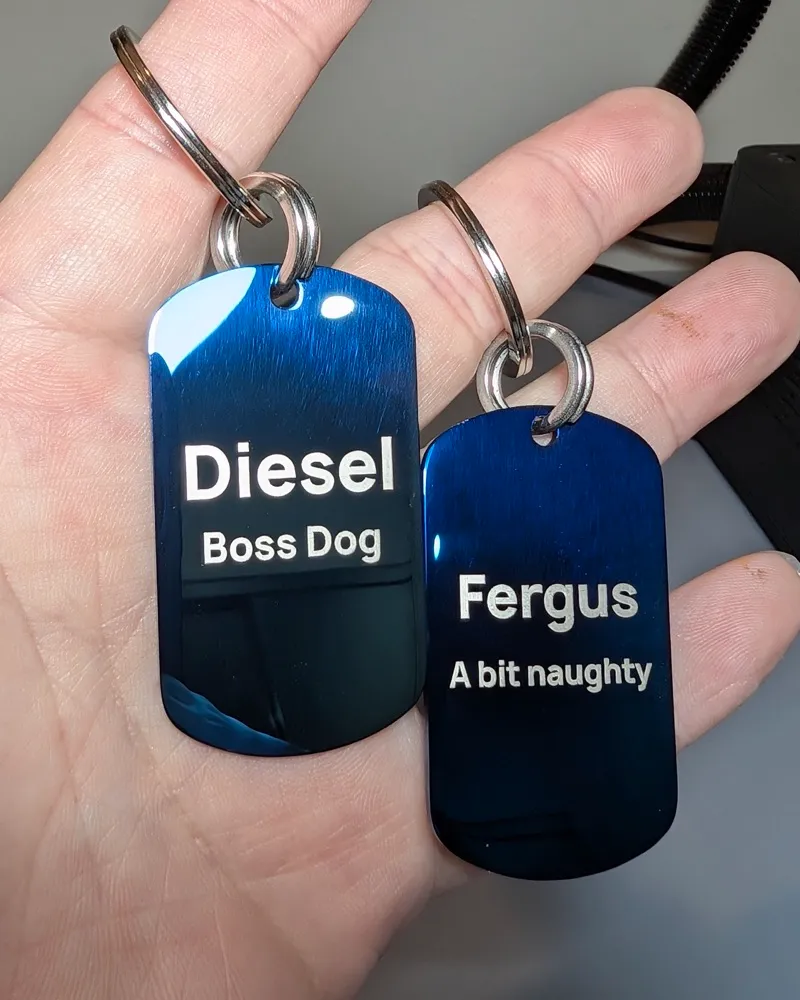
- Front: dog name + short personality line
- Back: owner name + phone number
- Priority: make the phone number easy to read
- Avoid: overcrowding the tag with too much text
- Goal: help someone contact you fast
← Return to the MoodTag Ecosystem
MoodTag Visible ID Method
A dog ID tag only helps if someone can read it quickly and contact you easily. MoodTag’s method is simple: put personality on the front, safety details on the back, and keep the phone number clear.
MoodTag Rule
If someone finds your dog, they should be able to look at the tag and understand what to do within a few seconds. That is the MoodTag 3-Second Finder Test.
The best dog ID tag layout is not the one with the most information. It is the one with the clearest information. Your dog’s name can help a finder connect with your dog, but your phone number is the most important detail on the tag.
The MoodTag Layout
MoodTag Never-Fall Tags use a simple front-and-back engraving system. The front shows your dog’s identity and personality. The back carries the contact details that help your dog get home.
Front Engraving
The front is where your dog’s identity and vibe live. Keep it short, clear, and easy to read.
Back Engraving
The back is the safety side of the tag. This is where the most useful contact information should go.
Proprietary Framework
Before engraving your dog’s tag, use this method to decide what earns space. Every line should help with identity, contact, or safe return.
This is the most important detail. If space is limited, protect the phone number before anything else.
A name can help the finder speak calmly to your dog, especially if your dog is nervous or unsure.
Owner name is optional, but it can make the tag feel more personal and make the call or text feel easier.
A front quote should add personality without making the tag harder to read.
A second number or short note can help, but only if the main phone number stays clear.
Recommended Engraving Details
Here is the MoodTag priority order. Start at the top and only add extra information if the tag size allows it to remain readable.
Essential
This is the fastest way for someone to contact you. It should be clear, correct, and easy to read.
Highly Recommended
The dog’s name helps identify them and may help the finder calm them down while contacting you.
Optional
Useful if you want the tag to feel more personal. Keep it short so the phone number stays readable.
Optional
Helpful if another family member can answer quickly, especially when you are at work, travelling, or offline.
Optional
Use only if it is short and important. Do not let it make the phone number harder to read.
Use Carefully
A full address can crowd the tag and may raise privacy concerns. A phone number is usually faster and cleaner.
Readability First
The most common mistake is treating the tag like a tiny business card. A dog ID tag has limited space. The more you add, the smaller the engraving becomes.
Long messages force the engraving to shrink. Keep the back focused on the contact details that matter most.
QR codes require a smartphone, internet access, and willingness to scan. A phone number is more direct.
A microchip is important, but a finder usually cannot scan it on the spot. A visible phone number is faster.
Personality is welcome, but not at the cost of readability. Keep front quotes short and punchy.
Front Quote Ideas
MoodTag front quotes should be short, punchy, and easy to engrave clearly. Each example below stays within MoodTag’s 25-character front quote limit.
Copy These Layouts
These examples follow the MoodTag principle: personality on the front, fast contact on the back.
Best for owners who want the cleanest and easiest-to-read format.
Best when you want the front message to guide the finder clearly.
Best when one primary contact is the fastest and most reliable option.
Choose The Right Never-Fall Setup
Once you know what to engrave, choose the setup that matches your dog’s real life. Lite is strong. MAX is strongest.
Strong Everyday Setup
Best for everyday active dogs, daily walks, dog parks, and owners upgrading from an ordinary tag.
Maximum Ring Strength
Best for strong pullers, rough-play dogs, escape-prone dogs, large dogs, adventure dogs, and dogs that have lost tags before.
Important: The 48kg and 100kg ratings refer to pull-force testing on the Never-Fall Ring. They do not refer to your dog’s body weight.
Plus Upgrade
Plus is an optional upgrade on the product page. It does not change the Lite or MAX ring strength. It adds practical extras for more peace of mind.
Before You Order
Before submitting your order, check every detail against this list.
MoodTag Guarantees
MoodTag guarantees are designed around quality, readability, and the Never-Fall Ring.
Applies to all MoodTag tags. Try it for 90 days. If you are not happy with the quality, finish, or setup, contact us for a refund.
If normal wear makes the engraved details unreadable, we will replace the tag.
If the Never-Fall Ring fails during normal use and clear photo proof is provided, we will replace the full Never-Fall tag setup.
Common Questions
The most important detail is a clear phone number. A dog ID tag is designed to help someone contact you quickly if your dog is found.
Yes, in most cases. Your dog’s name can help a finder speak calmly to your dog. MoodTag places the dog’s name on the front so the back can focus on contact details.
A full address is usually not necessary and can crowd the tag. A clear phone number is often faster, cleaner, and easier for a finder to use.
Microchipping is important, but a visible phone number is usually more useful in the moment. A finder can call or text you immediately without needing a scanner.
A QR code should not replace a visible phone number. QR codes require a smartphone, internet access, and someone willing to scan. A deeply engraved phone number is more direct.
Put your dog’s name and a short personality line on the front. MoodTag front quotes must stay within 25 characters so the engraving remains readable.
Build Your Dog’s ID Setup
MoodTag helps you create a premium Never-Fall dog ID tag with personality on the front, safety details on the back, and a stronger attachment setup for real dog movement.